透過閘控 executor 執行 AWS SAM 提供者操作
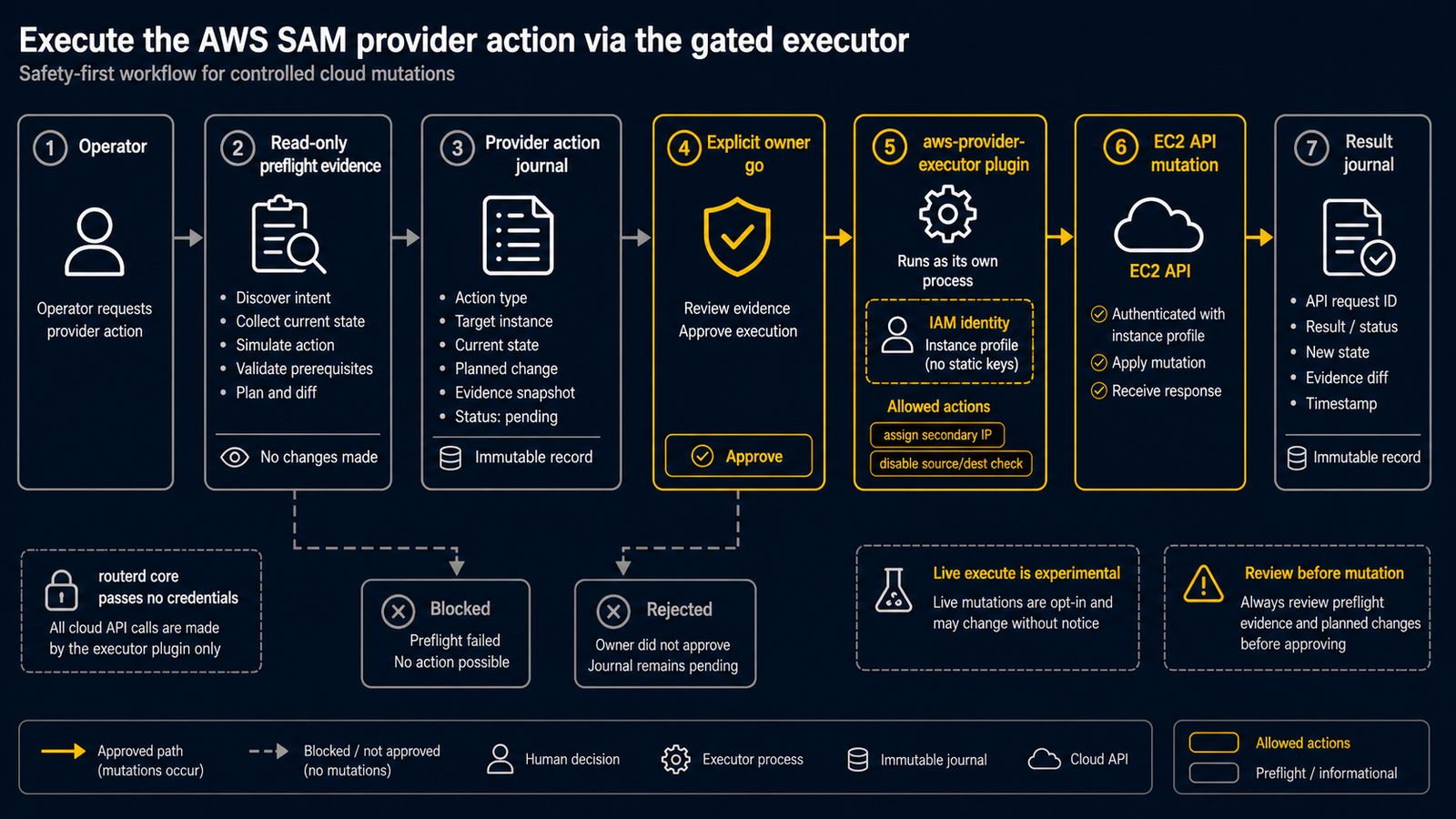
這是 CloudEdge 提供者操作執行的閘控即時變更路徑。 實驗性功能,僅限 AWS。 建構於 ADR 0007: Provider Action Execution 和 Selective Address Mobility 資料平面之上。請勿對生產環境或共用資源執行即時變更步驟。即時執行僅在審閱本 Runbook 和唯讀 preflight 證據後,取得擁有者明確核准後方可進行。
SAM 資料平面已在 AWS x PVE(ENI 次要私有 IP + source/dest check 停用)上完成實際雲端驗證。在此之前,這些 attach/detach 操作都是操作人員手動執行的。本指南介紹 aws-provider-executor 外掛程式,該外掛程式透過閘控日誌化執行路徑(ADR 0007)取代手動操作來執行相同的變更。
1. 範圍與邊界
- 僅限 AWS。只有一個提供者。 本 Runbook 不涉及 Azure 或 OCI。
- 拓撲: 1 台
routerd-cloud節點 + 1 台 cloud-client + 1 台 on-prem-client,從 on-prem 遷移到 cloud ENI 的已捕獲/32僅 1 個。實驗室位址遵循 SAM 參考:cloud-client 為.7,on-prem-client 為.9。 - 僅限專用實驗室。 使用為此測試建立的拋棄式 VPC / 子網路 / 執行個體。不使用生產或共用資源。 沒有其他相依的 EIP、安全群組、路由表或執行個體。
- 即時執行僅在擁有者明確核准後進行。 唯讀 preflight(第 4 節)可隨時執行。第 7 節的變更操作受閘控保護。
2. Executor 設計
aws-provider-executor 是一個通告 execute.providerAction 能力(PluginSpec.Capabilities 的 Phase 5 列舉值)的外掛程式。它以獨立程序運行,透過 AWS CLI 使用 EC2 執行個體 IAM 角色(執行個體設定檔) 進行驗證。routerd 核心不傳遞任何憑證 — executor 僅使用雲端原生身分,遵循 ADR 0007 的硬性不變量。
executor 從 stdin 讀取 1 個 ExecuteActionRequest,向 stdout 輸出 1 個 ExecuteActionResult。請求規格包含 Action、Provider、ProviderRef、Target(提供者金鑰:AWS 為 nicRef = ENI id、address、region)、Parameters、Mode(dry-run | execute)、IdempotencyKey、允許清單中的 Context。結果包含 Status(succeeded | failed | skipped)、Message、Observed(日誌記錄的非機密事實)、UndoAvailable、Error。
dry-run 模式不執行任何變更 — 僅進行 describe / 唯讀呼叫。execute 模式執行變更。
assign-secondary-ip
將已捕獲的 /32 附加到 cloud ENI。
-
dry-run(唯讀):describe ENI 並報告目前的次要 IP,輸出
would assign <address> to <eni>。aws ec2 describe-network-interfaces \--network-interface-ids "<eni-id>" --region "<region>" -
execute(變更):
aws ec2 assign-private-ip-addresses \--network-interface-id "<eni-id>" \--private-ip-addresses "<address>" --region "<region>"
ensure-forwarding-enabled
停用 ENI 的 source/dest check,使 cloud 節點能夠轉發已捕獲位址的流量。
-
dry-run(唯讀):describe 目前的
SourceDestCheck,輸出would set SourceDestCheck=false。 -
execute(變更):先 describe 目前的
SourceDestCheck,將變更前的值記錄到Observed,然後停用。# 1. 變更前擷取先前狀態(唯讀)aws ec2 describe-network-interfaces \--network-interface-ids "<eni-id>" --region "<region>" \--query 'NetworkInterfaces[0].SourceDestCheck'# 2. 變更aws ec2 modify-network-interface-attribute \--network-interface-id "<eni-id>" \--no-source-dest-check --region "<region>"結果的
Observed中必須包含priorSourceDestCheck=<true|false>。如此日誌便記錄了此操作執行前存在的狀態。undo 步驟依賴此值。
unassign-secondary-ip(assign-secondary-ip 的 undo)
aws ec2 unassign-private-ip-addresses \
--network-interface-id "<eni-id>" \
--private-ip-addresses "<address>" --region "<region>"
ensure-forwarding-disabled(ensure-forwarding-enabled 的 undo)
還原日誌 Observed.priorSourceDestCheck 中記錄的變更前狀態。
這是支撐安全性的關鍵規則:
-
priorSourceDestCheck == true→ 操作前 check 是啟用的 → 還原:aws ec2 modify-network-interface-attribute \--network-interface-id "<eni-id>" \--source-dest-check --region "<region>" -
priorSourceDestCheck == false→ 操作前已經停用(ENI 已是轉發器)→ 不做任何操作。回傳Status=skipped。不要強制重新啟用 check。
不要將 undo 寫死為啟用 check。 盲目地「undo 時重新啟用 source/dest-check」會破壞因自身原因已作為轉發器運作的設備/ENI。undo 必須讀回觀測值,僅還原實際變更的部分。
3. IAM 最小權限
附加到 executor EC2 執行個體的執行個體設定檔應僅授予以下 4 個 EC2 操作:
| 操作 | 使用情境 |
|---|---|
ec2:DescribeNetworkInterfaces | dry-run + preflight + 變更前狀態擷取 |
ec2:AssignPrivateIpAddresses | assign-secondary-ip 的 execute |
ec2:UnassignPrivateIpAddresses | unassign-secondary-ip 的 undo |
ec2:ModifyNetworkInterfaceAttribute | forwarding 的啟用/停用 execute |
為將範圍限定到實驗室 ENI / VPC,在 API 支援的範圍內設定資源 ARN 和條件(變更類 ENI 操作可按實驗室 ENI ARN 限定資源範圍,Describe* 不支援資源範圍限定,因此使用 ec2:Region / ec2:Vpc 等條件金鑰限制):
{
"Version": "2012-10-17",
"Statement": [
{
"Sid": "DescribeEnis",
"Effect": "Allow",
"Action": "ec2:DescribeNetworkInterfaces",
"Resource": "*",
"Condition": { "StringEquals": { "ec2:Region": "<region>" } }
},
{
"Sid": "MutateLabEni",
"Effect": "Allow",
"Action": [
"ec2:AssignPrivateIpAddresses",
"ec2:UnassignPrivateIpAddresses",
"ec2:ModifyNetworkInterfaceAttribute"
],
"Resource": "arn:aws:ec2:<region>:<account-id>:network-interface/<eni-id>"
}
]
}
不需要更多 EC2 權限。不需要 IAM/STS 寫入權限。不需要其他 AWS 服務。 如果所需呼叫不在此清單中,請停止 Runbook 而非擴大角色權限。
4. 唯讀 preflight
在變更之前,對專用實驗室執行以確認目標。這些操作均不執行變更。 lab-codex 執行這些操作並擷取輸出,作為擁有者核准前審閱的證據。
# 目標 ENI + 目前次要私有 IP + 目前 SourceDestCheck
aws ec2 describe-network-interfaces \
--network-interface-ids "<eni-id>" --region "<region>" \
--query 'NetworkInterfaces[0].{Eni:NetworkInterfaceId,SrcDstCheck:SourceDestCheck,PrivateIps:PrivateIpAddresses[*].PrivateIpAddress}'
# ENI 附加的執行個體
aws ec2 describe-instances \
--filters "Name=network-interface.network-interface-id,Values=<eni-id>" \
--region "<region>"
# ENI 的子網路
aws ec2 describe-subnets \
--subnet-ids "<subnet-id>" --region "<region>"
# 該子網路的路由表(確認預設閘道無意外變更)
aws ec2 describe-route-tables \
--filters "Name=association.subnet-id,Values=<subnet-id>" \
--region "<region>"
確認事項:
- IAM 角色僅具有第 3 節的 4 個權限 — 檢查執行個體設定檔附加的政策,驗證沒有寬泛的 EC2 權限、IAM/STS 寫入權限或其他服務。(這是政策文件的唯讀檢查,不做任何變更。)
- 位址尚未分配 — 確認
<address>尚未包含在上述第一個 describe 取得的 ENIPrivateIpAddresses中。如果已包含,assign 將是空操作,表示實驗室狀態不乾淨 — 停止並調查。 SourceDestCheck的目前值已記錄 — 此值是 executor 在 execute 時作為priorSourceDestCheck擷取的值。
5. 冒煙測試依賴的操作日誌欄位
action_executions 日誌為每個操作記錄以下內容:
idempotencyKey— 去重金鑰。已成功的金鑰不會被重新執行。provider—aws。action— 如:assign-secondary-ip、ensure-forwarding-enabled。target—eni、address、region。status—pending/approved/succeeded/failed/skipped/rolledBack。Observed.priorSourceDestCheck—true|false。變更前擷取的值,ensure-forwarding-enabled的 undo 讀取此值。executedAt— 時間戳記。result/error—ExecuteActionResult的訊息 /Error。
日誌是執行內容和冪等性守衛的唯一可信來源。憑證絕不記錄在日誌中。
6. Undo / 清理計畫
按逆序還原已套用的操作。所有步驟必須在即時執行之前就能描述。
-
Forwarding 的 undo —
ensure-forwarding-disabled。套用第 2 節的變更前狀態還原規則:如果Observed.priorSourceDestCheck為true,執行--source-dest-check重新啟用。如果為false,不做任何操作(skipped)。不要盲目啟用 check。 -
取消次要 IP 分配 —
unassign-secondary-ip:aws ec2 unassign-private-ip-addresses \--network-interface-id "<eni-id>" \--private-ip-addresses "<address>" --region "<region>" -
停止/終止實驗室執行個體並釋放產生費用的資源 — 停止或終止
routerd-cloud、cloud-client、on-prem-client 實驗室執行個體。釋放已配置的 EIP,刪除孤立的 EBS 磁碟區,刪除為此測試專門建立的 VPC/子網路/SG。
在擷取證據後,停止或刪除所有產生費用的資源。 不要讓實驗室執行個體處於閒置狀態。
7. 即時變更冒煙計畫 + 驗收
此冒煙測試驗證整個閘控路徑。僅在第 9 節的閘控取得核准後執行。
序列:
actionPlan產生(planner、dry-run,與 Phase 4.1 相同)。- 操作作為
pending匯入到日誌中(以idempotencyKey為金鑰)。 - 操作被核准(
routerctl action approve)。 - 操作由
aws-provider-executor執行(routerctl action execute --approved)。 - 日誌中顯示
succeeded。
驗收條件(必須全部滿足):
- actionPlan 產生 -> 匯入 -> 核准 -> 執行 -> 日誌
succeeded。 - 次要 IP 存在於 ENI 上(
describe-network-interfaces中<address>顯示在PrivateIpAddresses中)。 - ENI 的 Source/dest check 已停用(
SourceDestCheck=false)。日誌中記錄了Observed.priorSourceDestCheck。 - 對於 BGP
provider-secondary-ip,routerd-cloud不持有該位址作為 OS 本機位址;即使 provider secondary IP 仍保留在 ENI 上也是如此(捕獲僅用於路由/轉發,無 OS 位址)。 -
MobilityPool達到 Ready 狀態,目標位址的 provider action 已成功或確認無須執行。 -
routerctl doctor的 hybrid 檢查通過。 - cloud-client
.7和 on-prem-client.9— 雙向 ping 和 ssh 成功。 - 捕獲路徑上不存在 NAT(流量被路由/轉發,而非轉換)。
- 所有節點的預設閘道未變更。
- 第 6 節的 Teardown / undo 成功(包括 source/dest-check 的變更前狀態還原規則)。
- 證據擷取後產生費用的資源已停止/刪除。
8. 硬性停止
如果出現以下任何情況,立即中止(不採取「變通方案」):
- 憑證經由 routerd 核心傳遞(不允許 — executor 僅使用自身的執行個體設定檔)。
- 操作影響非實驗室資源。
- 涉及多個提供者。
- 無法事先描述復原/清理計畫。
- 提供者 API 回傳模糊/部分成功。
- 產生費用的資源在沒有活躍測試的情況下持續運行。
- 雲端資源運行期間等待人工判斷超過 10 分鐘 → 停止並釋放資源(停止執行個體以降低成本)。判斷後恢復。
- 任何命令意味著對生產或共用資源的變更。
9. 即時執行的閘控
即時變更僅在擁有者審閱本 Runbook 和唯讀 preflight 證據(第 4 節)後明確核准後執行。在取得核准前,只能執行唯讀步驟。