WireGuard Hub & Spoke 模板
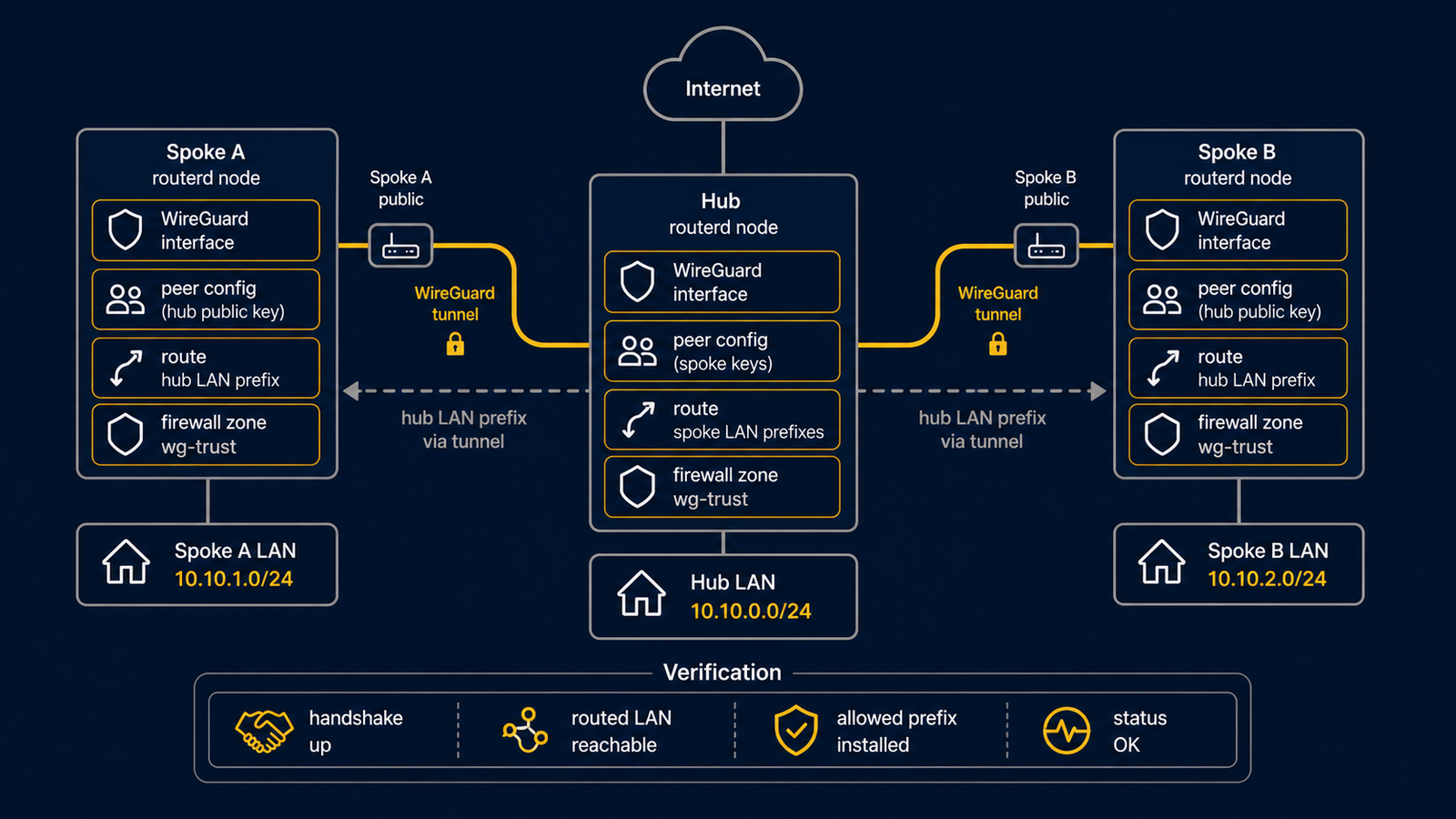
此为具备两个 spoke 的 routed WireGuard hub 模板。 实际使用前,请替换密钥、endpoint 及要广播的前缀。
完整的 YAML 位于 examples/wireguard-hub-spoke.yaml。
架构图
图示对照表
| 编号 | 说明 | 主要资源 |
|---|---|---|
| [1] | spoke A 的 tunnel 地址与 routed LAN 前缀。 | WireGuardPeer/spoke-a |
| [2] | spoke B 的 tunnel 地址与 routed LAN 前缀。 | WireGuardPeer/spoke-b |
| [3] | hub 端的 WireGuard 接口与地址。 | WireGuardInterface/wg-hub, IPv4StaticAddress/wg-hub-ipv4 |
重点说明
# [3] hub 端 WireGuard 接口与监听端口。
- kind: WireGuardInterface
  metadata:
    name: wg-hub
  spec:
    privateKeyFile: /usr/local/etc/routerd/secrets/wg-hub.key
    listenPort: 51820
    mtu: 1420

# [1] spoke A 的 tunnel 地址与 routed LAN 前缀。
- kind: WireGuardPeer
  metadata:
    name: spoke-a
  spec:
    interface: wg-hub
    publicKey: REPLACE_WITH_SPOKE_A_PUBLIC_KEY
    allowedIPs:
      - 10.44.0.11/32
      - 172.30.11.0/24
确认步骤
先在 daemon 未启动时进行独立检查。以下命令需要具有 sudo 权限的本地用户,但不会应用网络变更。
LAB_DIR="$(mktemp -d)"
sudo routerd validate --config examples/wireguard-hub-spoke.yaml
sudo routerd apply --config examples/wireguard-hub-spoke.yaml --once --dry-run --skip-service-manager \
  --state-file "$LAB_DIR/state.db" \
  --ledger-file "$LAB_DIR/ledger.db" \
  --status-file "$LAB_DIR/status.json"
rm -rf "$LAB_DIR"
服务运行后,才在路由器上运行 sudo routerctl describe WireGuardInterface/wg-hub
和 sudo wg show。
常见调整项目
- 私钥请存放于限制访问权限的文件中。
- 每个 peer 须明确指定 tunnel 地址
/32与 routed LAN 前缀。 - 若使用 routerd 管理 WAN 端防火墙,请一并添加 UDP 监听端口的放行规则。