WireGuard hub and spoke template
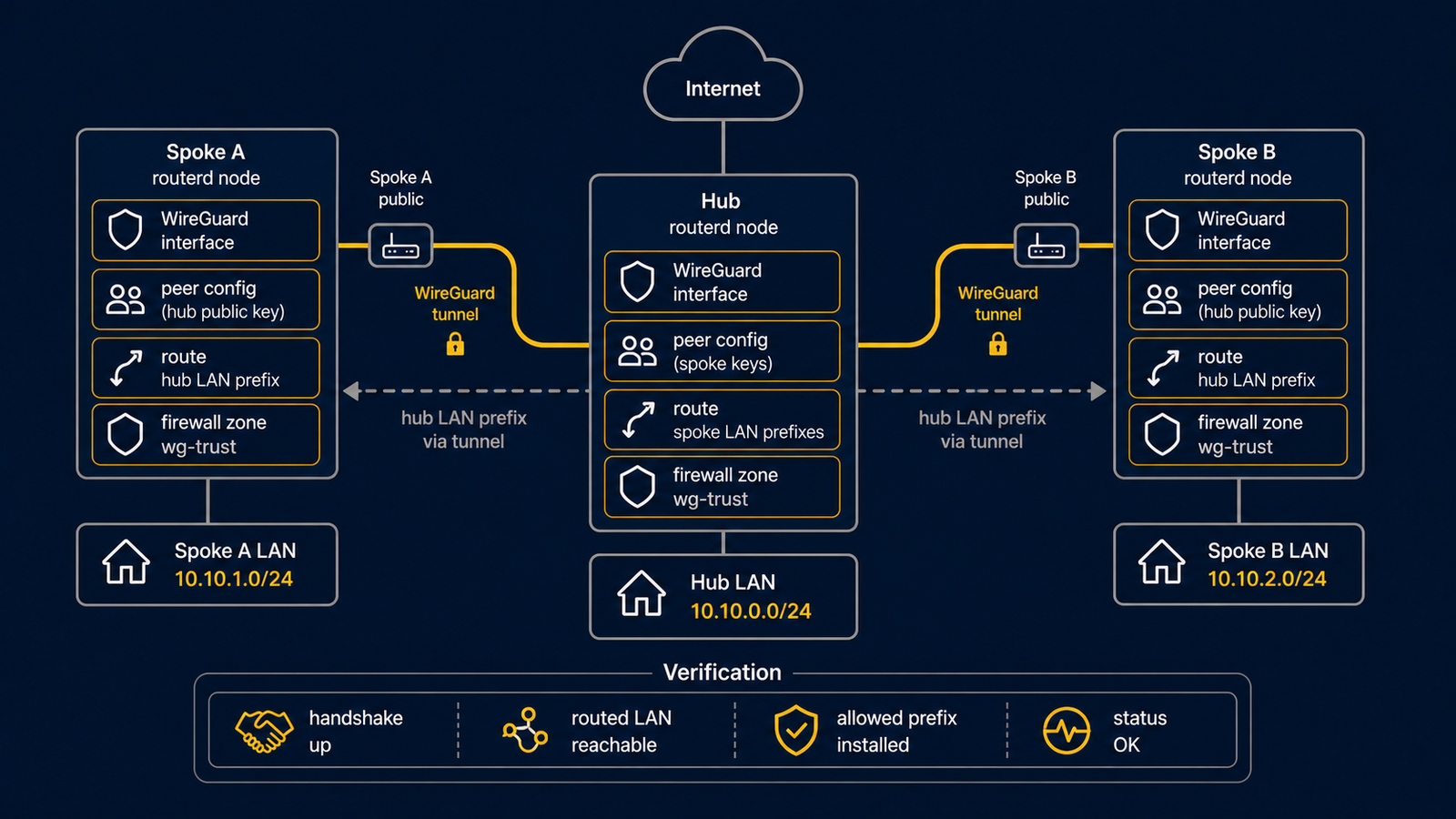
This template describes a routed WireGuard hub with two spokes. Treat it as a starting point: replace keys, endpoint names, and routed prefixes before use.
WAN reachability is a separate prerequisite
The template configures the WireGuard interface and peers. It does not create an upstream Internet port-forward, open a cloud security group, or prove a WAN firewall rule for UDP 51820. Arrange those safely before expecting remote peers to connect, and keep private keys out of the YAML repository.
The complete YAML template is in examples/wireguard-hub-spoke.yaml.
Topology
Diagram map
| No. | Meaning | Main resources |
|---|---|---|
| [1] | First spoke tunnel address and routed LAN prefix. | WireGuardPeer/spoke-a |
| [2] | Second spoke tunnel address and routed LAN prefix. | WireGuardPeer/spoke-b |
| [3] | Hub WireGuard interface and address. | WireGuardInterface/wg-hub, IPv4StaticAddress/wg-hub-ipv4 |
What this manages
| Area | routerd resources |
|---|---|
| WireGuard device | WireGuardInterface/wg-hub |
| Hub address | IPv4StaticAddress/wg-hub-ipv4 |
| Peer routes | WireGuardPeer/spoke-a, WireGuardPeer/spoke-b |
Key config
# [3] Hub WireGuard interface and listen port.
- kind: WireGuardInterface
  metadata:
    name: wg-hub
  spec:
    privateKeyFile: /usr/local/etc/routerd/secrets/wg-hub.key
    listenPort: 51820
    mtu: 1420

# [1] Spoke A tunnel address and routed LAN prefix.
- kind: WireGuardPeer
  metadata:
    name: spoke-a
  spec:
    interface: wg-hub
    publicKey: REPLACE_WITH_SPOKE_A_PUBLIC_KEY
    allowedIPs:
      - 10.44.0.11/32
      - 172.30.11.0/24
Checks
routerd validate --config examples/wireguard-hub-spoke.yaml

workdir=$(mktemp -d)
routerd apply --config examples/wireguard-hub-spoke.yaml --once --dry-run \
  --state-file "$workdir/state.db" \
  --ledger-file "$workdir/ledger.db" \
  --status-file "$workdir/status.json"
rm -rf "$workdir"
Common edits
- Keep the private key in a file with restricted permissions. If
privateKeyFileis configured and absent, non-dry-run apply generates the key file with mode0600; existing non-empty keys are not overwritten. - Use one
/32tunnel address per peer and add routed LAN prefixes explicitly. - Add firewall rules for the UDP listen port where the WAN firewall is managed by routerd.