Add firewall exceptions
Scenario
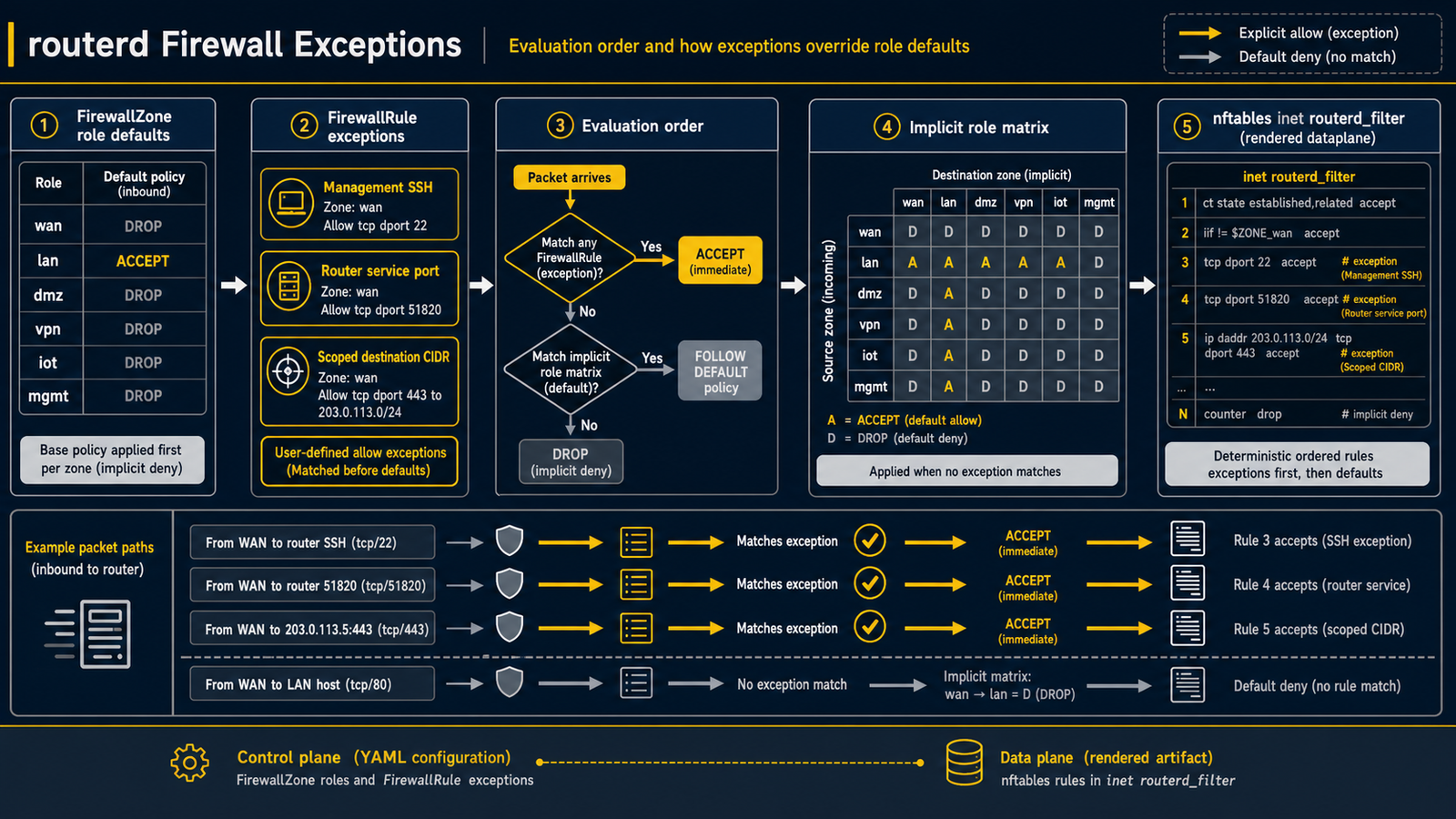
The role-based defaults from FirewallZone cover the common case, but you need an exception:
- Allow SSH from a specific management subnet.
- Open a service port on the router itself (a metrics endpoint, a custom listener).
- Permit a specific LAN host to receive inbound connections from the WAN (port forward / DMZ-style).
How routerd solves it
FirewallRule declares an exception that overrides the implicit role matrix. Rules are evaluated before the implicit matrix, and routerd-derived internal openings (DHCP, DNS, DHCPv6-PD, DS-Lite control traffic, etc.) are evaluated before user rules. That ordering keeps managed services alive even when you add restrictive rules.
Example: allow SSH from the management network
- apiVersion: firewall.routerd.net/v1alpha1
  kind: FirewallRule
  metadata:
    name: allow-admin-ssh
  spec:
    fromZone: management
    toZone: self
    protocol: tcp
    port: 22
    action: accept
fromZone and toZone reference FirewallZone names. toZone: self means traffic terminated by the router itself (as opposed to forwarded traffic).
Example: open a service port on the router
- apiVersion: firewall.routerd.net/v1alpha1
  kind: FirewallRule
  metadata:
    name: allow-metrics
  spec:
    fromZone: lan
    toZone: self
    protocol: tcp
    destinationPorts:
      - "9100"
    action: accept
Example: allow one management host from the LAN
Use destinationCIDRs when the exception should apply to a specific host
inside the destination zone. This keeps the rest of the management segment
closed by the role matrix.
- apiVersion: firewall.routerd.net/v1alpha1
  kind: FirewallRule
  metadata:
    name: allow-lan-to-admin-console
  spec:
    fromZone: lan
    toZone: management
    destinationCIDRs:
      - 192.0.2.126/32
    protocol: tcp
    destinationPorts:
      - "8080"
    action: accept
Example: multi-port web and ICMP echo
Use destinationPorts when a rule covers more than one TCP or UDP port.
ICMP rules can be narrowed to specific type names.
- apiVersion: firewall.routerd.net/v1alpha1
  kind: FirewallRule
  metadata:
    name: wan-web
  spec:
    fromZone: wan
    toZone: self
    protocol: tcp
    destinationPorts:
      - "80"
      - "443"
    action: accept

- apiVersion: firewall.routerd.net/v1alpha1
  kind: FirewallRule
  metadata:
    name: wan-icmp-echo
  spec:
    fromZone: wan
    toZone: self
    protocol: icmp
    icmpType: echo-request
    action: accept
Example: reject SSH over a rate or connection limit
rateLimit matches traffic over the configured threshold. connLimit matches
when one source already has more than the allowed concurrent tracked states.
- apiVersion: firewall.routerd.net/v1alpha1
  kind: FirewallRule
  metadata:
    name: ssh-bruteforce-over-limit
  spec:
    fromZone: wan
    toZone: self
    protocol: tcp
    destinationPorts:
      - "22"
    action: reject
    rateLimit:
      rate: 8
      burst: 16
      unit: packet
      per: minute
      log: true
    connLimit:
      maxPerSource: 4
      log: true
Validating before apply
Use the local simulator to check what the rule would do before you apply it:
routerctl firewall test from=wan to=self proto=tcp dport=22
routerctl describe firewall
The first command reports accept or drop for the specific 5-tuple. The second prints the full effective ruleset including role-matrix defaults and managed openings.