WAN-side services
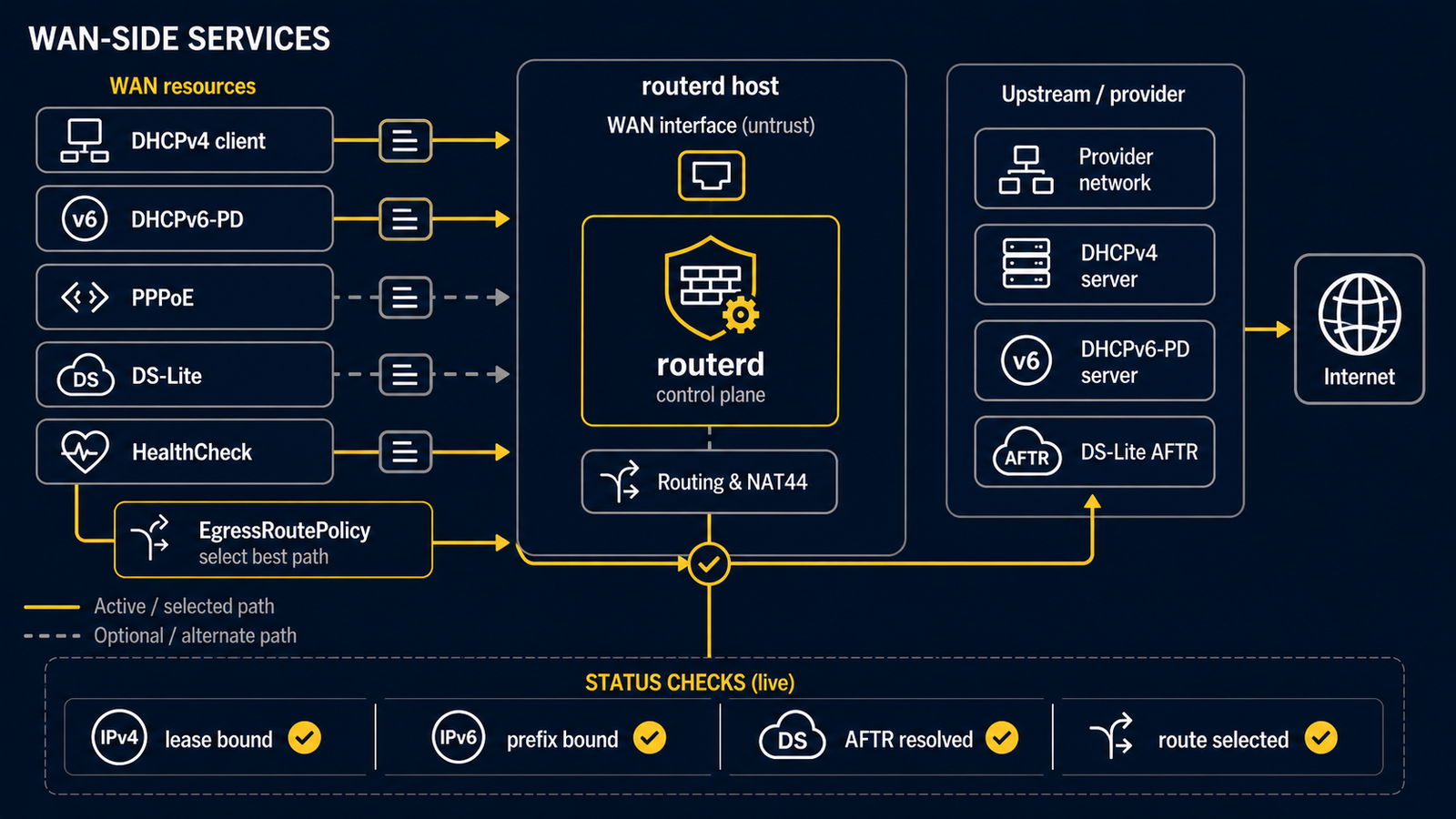
This page introduces the routerd resources that handle the WAN side of a router: getting an upstream link, obtaining IP addresses and prefixes from the ISP, terminating tunnels, and exposing one or more upstream paths to the rest of the controller chain.
The companion page on the LAN side covers what the router serves to its inside.
Each block belongs in a complete Router.spec.resources list with matching
interfaces and LAN resources. ISP settings, credentials, AFTR names, and
address ranges are not interchangeable. Build the first lab router
first, then use a matching complete example before making a live WAN change.
Summary table
| Concern | Resource | Daemon backing it |
|---|---|---|
| Physical / virtual interface | Interface, IPv4StaticAddress | (kernel) |
| IPv4 from ISP via DHCP | DHCPv4Client | routerd-dhcpv4-client |
| IPv6 prefix from ISP | DHCPv6PrefixDelegation, IPv6DelegatedAddress | routerd-dhcpv6-client |
| Other DHCPv6 options (DNS, AFTR, etc.) | DHCPv6Information | routerd-dhcpv6-client |
| Upstream time sources | NTPClient | systemd-timesyncd or ntpd |
| PPPoE session | PPPoESession | routerd-pppoe-client |
| IPv4 over IPv6 (DS-Lite) | DSLiteTunnel | (kernel ip6tnl) |
| WAN selection | EgressRoutePolicy, HealthCheck | routerd-healthcheck@<name> |
| IPv4 NAT (masquerade) | NAT44Rule | (nftables) |
| Static IPv4 route | IPv4Route | (kernel) |
You typically pick a subset of these depending on what the ISP gives you.
Pattern A: Native dual-stack (IPv4 + IPv6)
The ISP gives you a public IPv4 address via DHCPv4 and an IPv6 prefix via DHCPv6-PD on the same WAN interface.
- apiVersion: net.routerd.net/v1alpha1
  kind: Interface
  metadata: {name: wan}
  spec:
    ifname: ens18
    role: untrust

- apiVersion: net.routerd.net/v1alpha1
  kind: DHCPv4Client
  metadata: {name: wan-v4}
  spec:
    interface: wan

- apiVersion: net.routerd.net/v1alpha1
  kind: DHCPv6PrefixDelegation
  metadata: {name: wan-pd}
  spec:
    interface: wan

- apiVersion: net.routerd.net/v1alpha1
  kind: IPv6DelegatedAddress
  metadata: {name: lan-base}
  spec:
    prefixDelegation: wan-pd
    interface: lan
    subnetID: "0"
    addressSuffix: "::1"

- apiVersion: net.routerd.net/v1alpha1
  kind: NAT44Rule
  metadata: {name: lan-to-wan}
  spec:
    type: masquerade
    egressInterface: wan
    sourceRanges:
      - 192.168.10.0/24
DHCPv4Client runs routerd-dhcpv4-client and writes the lease to lease.json. The kernel takes the address; routerd publishes events for downstream resources to react.
DHCPv6PrefixDelegation runs routerd-dhcpv6-client and obtains an IA_PD. IPv6DelegatedAddress carves a /64 (or other length) for a LAN side.
Upstream NTP / SNTP
NTPClient can derive time servers from DHCPv4 option 42 or DHCPv6 option 31. If the upstream does not provide one, routerd writes the configured public fallback servers to the OS NTP client (systemd-timesyncd on Linux / NixOS, ntpd on FreeBSD).
- apiVersion: system.routerd.net/v1alpha1
  kind: NTPClient
  metadata: {name: system-time}
  spec:
    provider: systemd-timesyncd
    managed: true
    source: auto
    serverFrom:
      - resource: DHCPv4Client/wan-v4
        field: ntpServers
      - resource: DHCPv6Information/wan-info
        field: sntpServers
    fallbackServers:
      - ntp.jst.mfeed.ad.jp
      - ntp.nict.jp
Use this with the LAN-side ntpServerFrom and sntpServerFrom fields when the router itself should be the time source advertised to clients.
Pattern B: PPPoE for IPv4, DHCPv6-PD for IPv6
Common for older xDSL plans where the IPv4 path goes through PPPoE while IPv6 still rides native DHCPv6-PD on the same physical link.
- apiVersion: net.routerd.net/v1alpha1
  kind: PPPoESession
  metadata: {name: wan-pppoe}
  spec:
    interface: wan
    ifname: ppp-home
    username: "user@isp.example"
    passwordFile: /usr/local/etc/routerd/secrets/pppoe-password
    mtu: 1454
    mru: 1454
    defaultRoute: true

- apiVersion: net.routerd.net/v1alpha1
  kind: DHCPv6PrefixDelegation
  metadata: {name: wan-pd}
  spec:
    interface: wan
PPPoESession runs routerd-pppoe-client, which wraps pppd/rp-pppoe on
Linux and renders an mpd5 client configuration on FreeBSD. The session
interface (typically ppp0) becomes available for routes and NAT44Rule.
Pattern C: DS-Lite (IPv6-only access network with IPv4-in-IPv6 tunnel)
The ISP provides only IPv6 natively. IPv4 is delivered through a DS-Lite tunnel to an Address Family Transition Router (AFTR).
- apiVersion: net.routerd.net/v1alpha1
  kind: DHCPv6PrefixDelegation
  metadata: {name: wan-pd}
  spec:
    interface: wan

- apiVersion: net.routerd.net/v1alpha1
  kind: DHCPv6Information
  metadata: {name: wan-info}
  spec:
    interface: wan

- apiVersion: net.routerd.net/v1alpha1
  kind: DSLiteTunnel
  metadata: {name: ds-lite-primary}
  spec:
    interface: wan
    tunnelName: ds-lite-primary
    aftrFQDN: gw.transix.jp
    aftrDNSServers:
      - 2404:1a8:7f01:a::3
      - 2404:1a8:7f01:b::3
    localAddressSource: delegatedAddress
    localDelegatedAddress: lan-base
    localAddressSuffix: "::100"
    defaultRoute: true
DSLiteTunnel is created as a kernel ip6tnl device once the AFTR address is
resolved. The aftrDNSServers values are ISP-specific: use the resolvers your
access line requires, because an AFTR name is often not meaningful through a
public resolver.
Pattern D: Multi-WAN (primary + backup)
When more than one path is available, pair the WAN-acquisition resources with EgressRoutePolicy and HealthCheck. See Multi-WAN egress with health-based selection for the full pattern.
Status and observation
For each WAN resource, sudo routerctl describe <kind>/<name> shows the current phase, observed leases, and recent events. Examples:
sudo routerctl describe DHCPv6PrefixDelegation/wan-pd  # phase: Bound, prefix: 2001:db8:1::/56
sudo routerctl describe DSLiteTunnel/ds-lite-primary   # phase: Up, aftr: 2001:db8:cafe::1
sudo routerctl describe EgressRoutePolicy/ipv4-default # selectedCandidate: ds-lite-primary
The Web Console summarises the same information under the Overview and Resources tabs, and the Connections tab shows real conntrack/pf state per WAN path.