nDPI agent native package
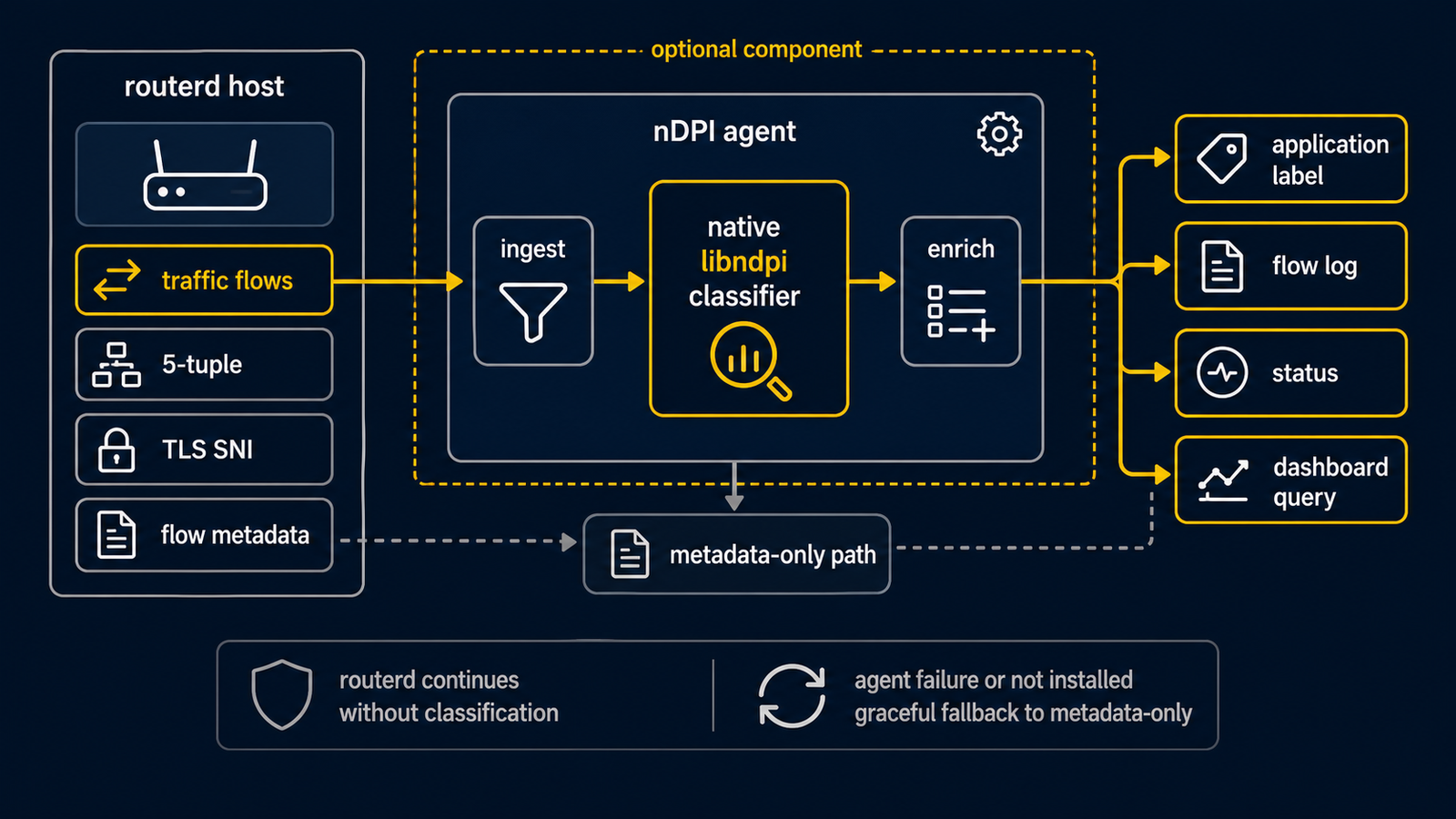
routerd's normal Linux release archives are built with CGO_ENABLED=0 and keep
all included routerd binaries statically linked. The optional
routerd-ndpi-agent-libndpi archive is the exception package for hosts that
need native nDPI classification.
This archive contains only:
bin/routerd-ndpi-agentshare/doc/README.mdshare/doc/VERSIONshare/doc/TARGET
The binary is built with CGO_ENABLED=1 -tags libndpi and links to the target
system's libndpi runtime. It is intended as an override for a host that
already installed the normal routerd archive.
Install
Download both the normal routerd release archive and the matching native agent archive, then let the installer apply them in one transaction:
curl -LO https://github.com/imksoo/routerd/releases/download/v20260707.1514/routerd-linux-amd64.tar.gz
curl -LO https://github.com/imksoo/routerd/releases/download/v20260707.1514/routerd-linux-amd64.tar.gz.sha256
curl -LO https://github.com/imksoo/routerd/releases/download/v20260707.1514/routerd-ndpi-agent-libndpi-linux-amd64.tar.gz
curl -LO https://github.com/imksoo/routerd/releases/download/v20260707.1514/routerd-ndpi-agent-libndpi-linux-amd64.tar.gz.sha256
sha256sum -c routerd-linux-amd64.tar.gz.sha256
sha256sum -c routerd-ndpi-agent-libndpi-linux-amd64.tar.gz.sha256
tar -xzf routerd-linux-amd64.tar.gz
sudo ./install.sh --with-ndpi \
  --with-ndpi-archive ./routerd-ndpi-agent-libndpi-linux-amd64.tar.gz
The host must provide a libndpi runtime package with the same shared-library
ABI as the archive was built against. On Debian/Ubuntu, install the optional
runtime dependencies with:
sudo apt-get install libndpi-bin
Verify that the native backend is active:
sudo curl --silent --unix-socket /run/routerd/ndpi-agent/default.sock \
  http://unix/v1/status
The response should include "libndpiLoaded": true.
Upgrade note
The normal routerd archive includes the default static routerd-ndpi-agent.
During upgrades, install.sh preserves an existing native agent when its
selftest reports "libndpiLoaded": true and the archive agent does not.
Run the normal installer with --with-ndpi on hosts that require native
application-layer classification. The installer fails if the final installed
agent does not report "libndpiLoaded": true, so the static fallback cannot
silently satisfy a native nDPI intent.
For fresh installs, or when you want the native agent archive to be the explicit
source of truth, pass --with-ndpi-archive PATH. The installer validates the
archive target marker, rejects unsafe tar paths, verifies the neighboring
.sha256 file when present, checks that the archive agent reports
"libndpiLoaded": true, and rolls back the whole install if the overlay fails.
Configure
routerd-dpi-classifier must be configured with --engine auto or
--engine ndpi-agent and an --ndpi-agent-socket pointing at the agent socket.
auto is recommended because it falls back to the built-in classifier if the
native agent is unavailable.
The deprecated --ndpi-reader option does not enable native nDPI
classification.