Basic NAT and firewall policy
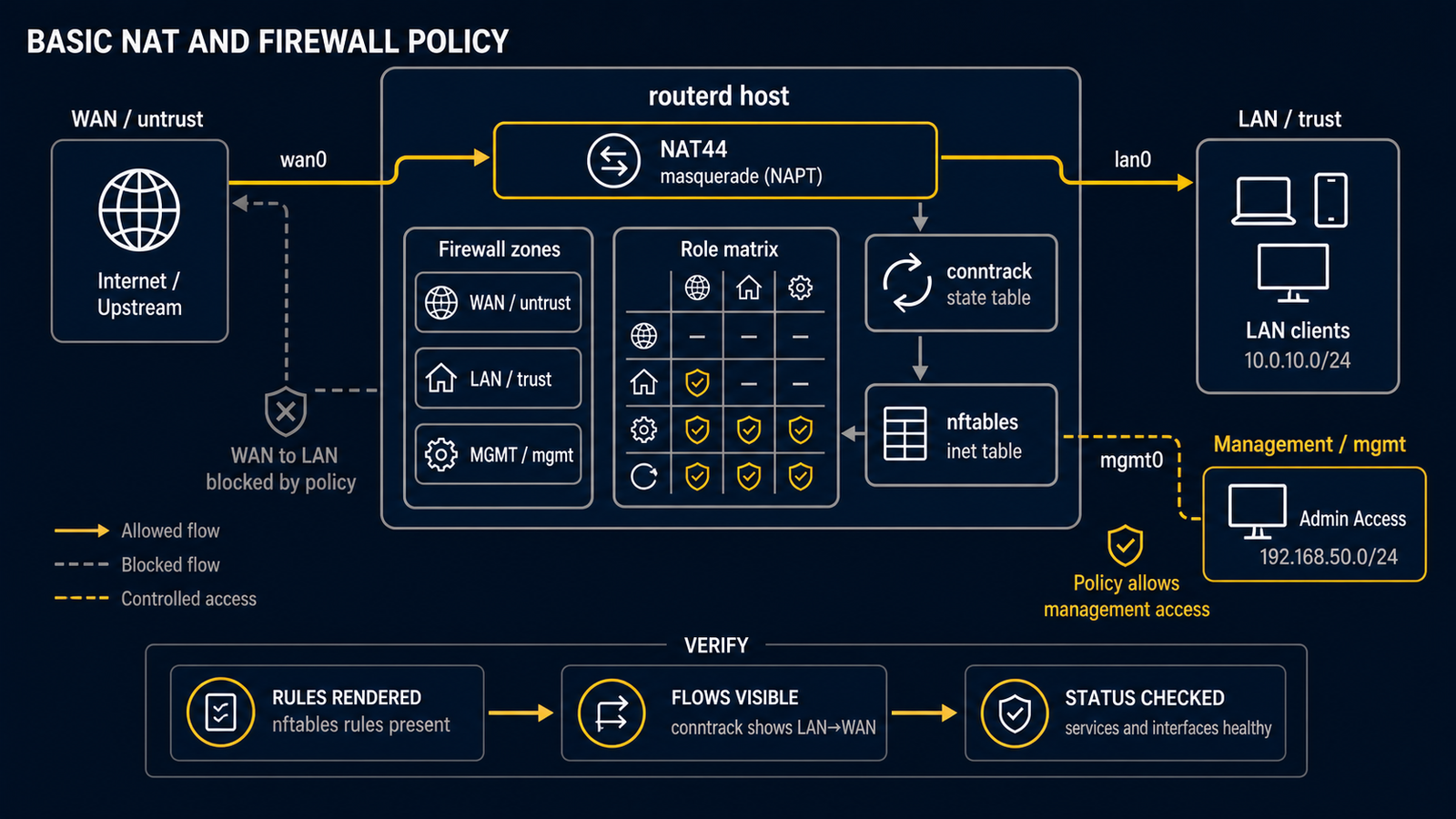
NAT and packet filtering are easy to confuse. NAT lets several private LAN addresses share one upstream IPv4 address. A firewall decides which packets may pass. They are separate jobs.
routerd's firewall resources are groundwork, not a complete security product or security certification. Do not expose an Internet-facing router or rely on this example as the only protection for a home, school, or work network. First test it in an isolated lab and keep a console recovery path.
Scenario
The router has a WAN interface (wan) connected to an upstream network and a
LAN interface (lan) with private IPv4 addresses. The LAN range in this
example is 192.168.50.0/24; choose a range that does not overlap with your
WAN, VPN, management, or another LAN.
NAT44: one clear modern form
- apiVersion: net.routerd.net/v1alpha1
  kind: NAT44Rule
  metadata:
    name: lan-to-wan
  spec:
    type: masquerade
    egressInterface: wan
    sourceRanges:
      - 192.168.50.0/24
masquerade is the NAT mode, not a true/false switch. It means that packets
leaving wan use the current IPv4 address of wan as their source address.
That is commonly useful when the upstream gives the WAN address by DHCP or
PPPoE.
Zone labels
The following labels describe the intended trust level of each interface. They make the policy readable and provide inputs for routerd's current firewall groundwork.
- apiVersion: firewall.routerd.net/v1alpha1
  kind: FirewallZone
  metadata:
    name: wan
  spec:
    role: untrust
    interfaces:
      - wan

- apiVersion: firewall.routerd.net/v1alpha1
  kind: FirewallZone
  metadata:
    name: lan
  spec:
    role: trust
    interfaces:
      - lan

- apiVersion: firewall.routerd.net/v1alpha1
  kind: FirewallPolicy
  metadata:
    name: home
  spec:
    logDeny: true
Add only the resources you understand, validate the whole file, and inspect the generated result on an isolated host. Do not infer a complete default accept/drop matrix from this short example.
Check before a live change
routerd validate --config router.yaml

workdir=$(mktemp -d)
routerd apply --config router.yaml --once --dry-run \
  --state-file "$workdir/state.db" \
  --ledger-file "$workdir/ledger.db" \
  --status-file "$workdir/status.json"
rm -rf "$workdir"
After a reviewed configuration is running, inspect it with the daemon-backed tools:
sudo routerctl describe NAT44Rule/lan-to-wan
sudo nft list table ip routerd_nat
sudo nft list table inet routerd_filter