Basic IPv4 NAT gateway
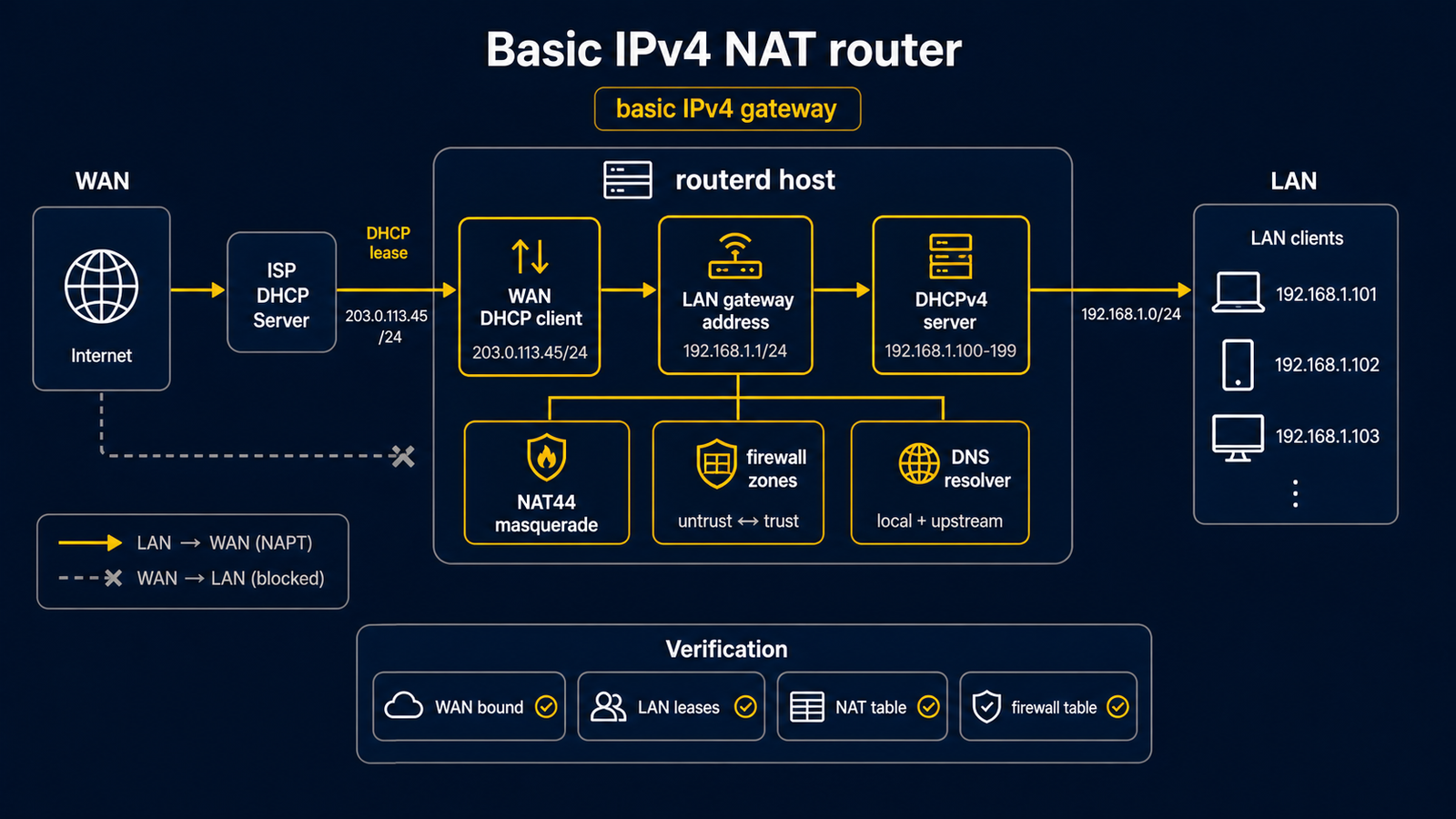
This is a small isolated-lab router shape that gives LAN clients IPv4 internet access through a DHCP-acquired WAN address. It is a learning example, not a replacement for an already working household or school router.
The complete, validated YAML is in examples/example-basic-ipv4-nat.yaml.
Topology
Diagram map
| No. | Meaning | Main resources |
|---|---|---|
| [1] | Upstream network that gives the router a WAN IPv4 lease. | External to routerd |
| [2] | Physical WAN interface. routerd runs a DHCPv4 client here. | Interface/wan, DHCPv4Client/wan-dhcpv4 |
| [3] | Linux host applying derived forwarding sysctls and nftables rules. | Derived host runtime |
| [4] | LAN gateway address owned by routerd. | Interface/lan, IPv4StaticAddress/lan-base |
| [5] | DHCPv4 clients using the router as gateway and external DNS servers. | DHCPv4Server/lan-dhcpv4 |
What this manages
| Area | routerd resources |
|---|---|
| WAN address | Interface/wan, DHCPv4Client/wan-dhcpv4 |
| LAN address | Interface/lan, IPv4StaticAddress/lan-base |
| LAN DHCPv4 | DHCPv4Server/lan-dhcpv4 |
| IPv4 internet access | NAT44Rule/lan-to-wan |
| Basic filtering | FirewallZone/wan, FirewallZone/lan, FirewallPolicy/home |
This example leaves DNS resolution simple: DHCPv4 clients receive the external
resolvers 1.1.1.1 and 1.0.0.1. The router is not a DNS server in this
file. Choose resolvers permitted by your network, or add DNSResolver and a
local DNS design before advertising the router's LAN address as DNS.
Key config
# [2] WAN address is learned from the upstream network.
- apiVersion: net.routerd.net/v1alpha1
  kind: DHCPv4Client
  metadata:
    name: wan-dhcpv4
  spec:
    interface: wan

# [4] LAN gateway address owned by routerd.
- apiVersion: net.routerd.net/v1alpha1
  kind: IPv4StaticAddress
  metadata:
    name: lan-base
  spec:
    interface: lan
    address: 192.168.10.1/24

# [5] LAN clients receive addresses, a gateway, and external DNS servers.
- apiVersion: net.routerd.net/v1alpha1
  kind: DHCPv4Server
  metadata:
    name: lan-dhcpv4
  spec:
    interface: lan
    addressPool:
      start: 192.168.10.100
      end: 192.168.10.199
      leaseTime: 12h
    gatewayFrom:
      resource: IPv4StaticAddress/lan-base
      field: address
    dnsServers:
      - 1.1.1.1
      - 1.0.0.1

# [2] -> [5] LAN IPv4 is masqueraded when it exits through the WAN.
- apiVersion: net.routerd.net/v1alpha1
  kind: NAT44Rule
  metadata:
    name: lan-to-wan
  spec:
    type: masquerade
    egressInterface: wan
    sourceRanges:
      - 192.168.10.0/24
NAT44Rule renders into routerd's nftables NAT table. The firewall resources
put the WAN interface in an untrust zone and the LAN interface in a trust
zone.
Run this example
Use Bring up the first lab router for the complete
release-matched download, interface edits, validation, isolated dry-run, live
apply, daemon startup, and client checks. Release archives do not include the
repository’s examples/ directory. The YAML excerpts above explain the model;
use the complete downloaded file, not just the excerpts.
Common edits
- Change
ens18andens19to the host's real interface names. - Change
192.168.10.0/24when it overlaps with an upstream, VPN, or management network. - Add a
DNSResolverbefore advertising the router as DNS. This example does not make the router answer DNS itself.