DHCP lease sync for HA routers
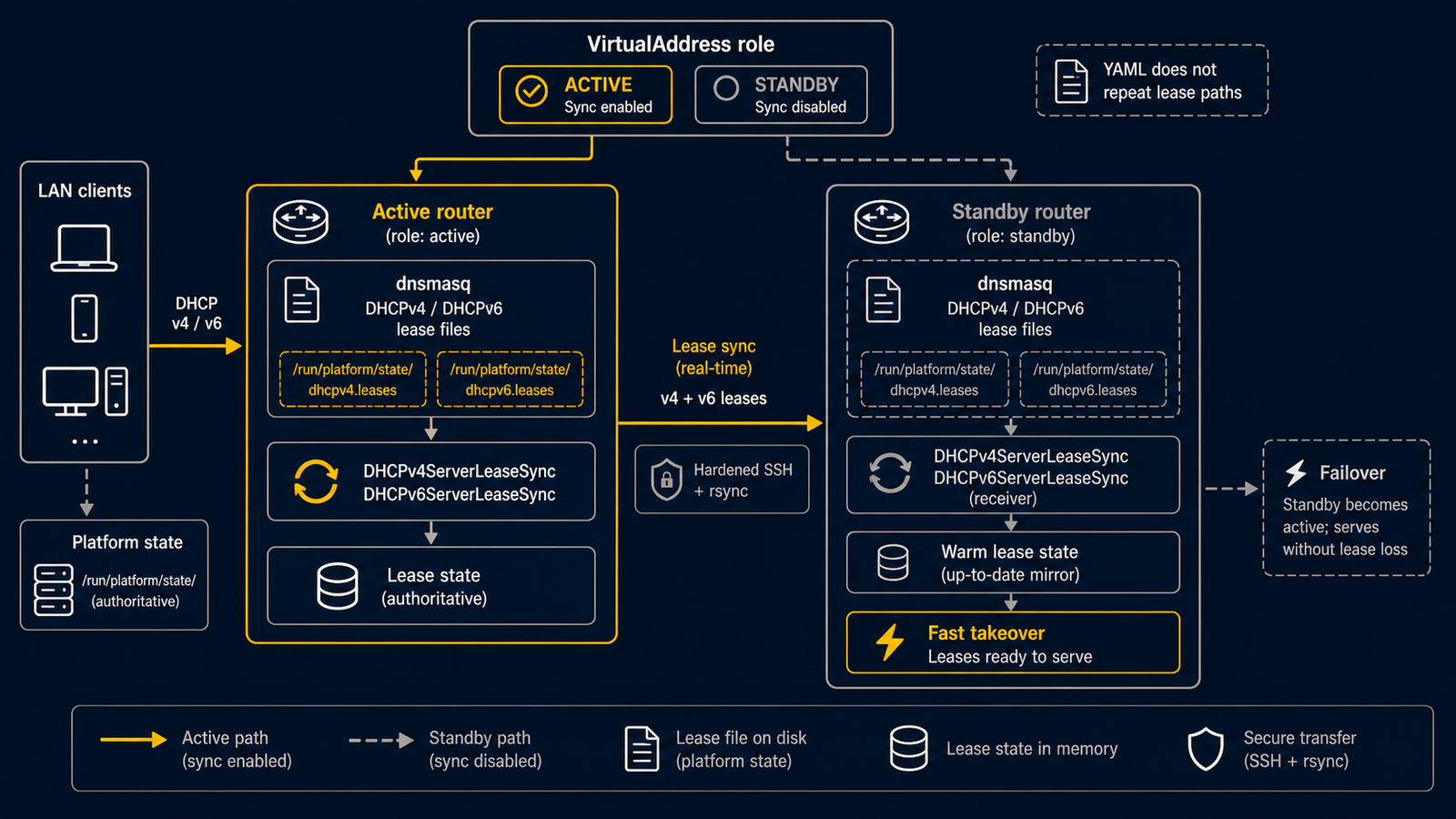
Use DHCPv4ServerLeaseSync, DHCPv6ServerLeaseSync, or
DHCPv6PrefixDelegationLeaseSync when two routerd nodes share a DHCP role and
the active node must keep the standby node's lease state warm. These resources
are intended for active-to-standby sync; they should normally be gated by a
VirtualAddress role so the backup does not copy stale leases back to the
active node.
The complete example is in examples/dhcp-lease-sync-ha.yaml.
Use persistent defaults
routerd stores dnsmasq server leases under its platform state directory by default. Keep the DHCP resources free of runtime-only lease paths:
- apiVersion: net.routerd.net/v1alpha1
  kind: DHCPv4Server
  metadata:
    name: lan-dhcpv4
  spec:
    interface: lan
    addressPool:
      start: 192.168.30.100
      end: 192.168.30.199

- apiVersion: net.routerd.net/v1alpha1
  kind: DHCPv6Server
  metadata:
    name: lan-dhcpv6
  spec:
    interface: lan
    mode: stateful
    addressPool:
      start: fd00:30::100
      end: fd00:30::1ff
The sync resource derives the actual file path from the source kind, so the configuration does not need to repeat implementation paths.
Sync only from the active node
Gate the lease sync on the local VirtualAddress status. The sync runs only
while the VIP role is master:
- apiVersion: net.routerd.net/v1alpha1
  kind: DHCPv4ServerLeaseSync
  metadata:
    name: lan-v4-leases
  spec:
    source:
      resource: DHCPv4Server/lan-dhcpv4
    interval: 30s
    targets:
      - name: standby
        host: routerd-standby.lan.example
        user: routerd
    when:
      state:
        VirtualAddress/lan-vip.role:
          equals: master
For a stateful DHCPv6 server, use DHCPv6ServerLeaseSync with
source.resource: DHCPv6Server/<name>. For WAN-side prefix delegation, use
DHCPv6PrefixDelegationLeaseSync with
source.resource: DHCPv6PrefixDelegation/<name>.
- apiVersion: net.routerd.net/v1alpha1
  kind: DHCPv6PrefixDelegationLeaseSync
  metadata:
    name: wan-pd-lease
  spec:
    source:
      resource: DHCPv6PrefixDelegation/wan-pd
    targets:
      - name: standby
        host: routerd-standby.lan.example
        user: routerd
    when:
      state:
        VirtualAddress/lan-vip.role:
          equals: master
On promotion, the standby starts from its last synced lease state instead of an empty database.
SSH requirements
Lease sync uses rsync over SSH. Prepare non-interactive SSH before enabling
the resource:
- Create or install an SSH key for the routerd process user on the active node.
- Install the public key in
authorized_keysfortarget.useron the standby node. - Preload or manage
known_hostsfortarget.host;BatchMode=yesprevents interactive host-key prompts. - Ensure the target user can create the derived destination directory and write the lease file.
routerd adds these SSH defaults when target.sshOptions does not override the
same key:
-o BatchMode=yes -o ConnectTimeout=10
It also adds rsync --timeout=60 and runs each sync command with a controller
context deadline. Operators can override the SSH options with
target.sshOptions and the rsync timeout with target.options:
targets:
  - host: routerd-standby.lan.example
    user: routerd
    sshOptions:
      - -o
      - ConnectTimeout=5
    options:
      - --timeout=30
Check it
routerctl validate -f examples/dhcp-lease-sync-ha.yaml --replace
routerctl plan -f examples/dhcp-lease-sync-ha.yaml --replace
routerctl describe VirtualAddress/lan-vip
routerctl describe DHCPv4ServerLeaseSync/lan-v4-leases
When the node is not master, routerd serve filters the resource through
spec.when. When the node is master and the lease file exists, status should
move to Synced; if the lease file is missing, it stays Pending until dnsmasq
creates it.