Troubleshooting
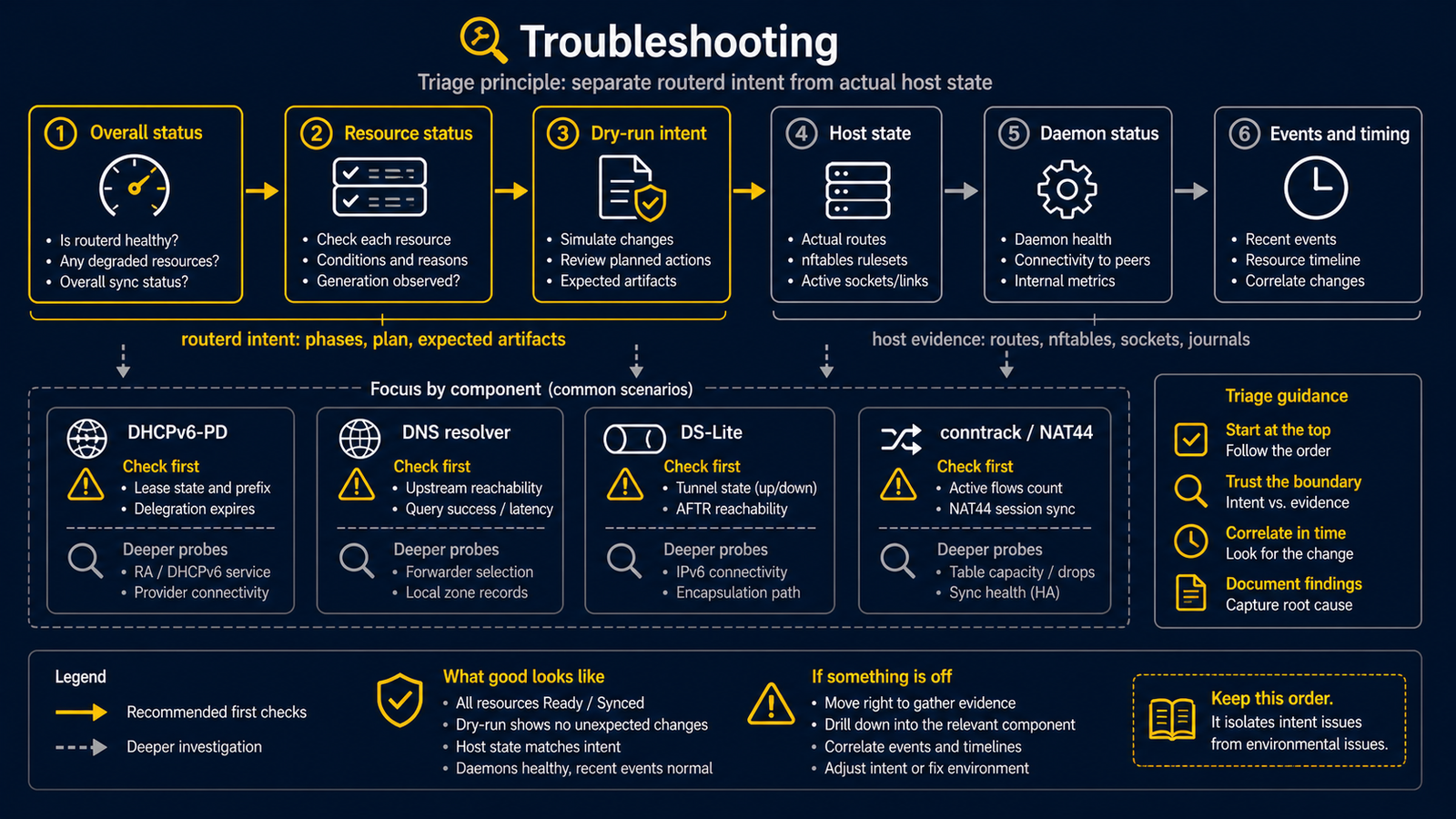
When investigating routerd, first separate what routerd intends from what the host actually has. Verify routerd's view, then compare against the OS state.
When the service or status command fails
On Ubuntu, start by checking the service rather than retrying a live apply:
sudo systemctl status routerd.service --no-pager
sudo journalctl -u routerd.service -n 50 --no-pager
sudo routerd validate --config /usr/local/etc/routerd/router.yaml
- Missing configuration or validation errors: return to the first-router tutorial and review the file before starting.
- Missing socket or connection refused:
routerctlrequires the running daemon. A one-shotrouterd apply --onceexits and does not provide control sockets. - Permission denied: first try
sudo routerctl get status. For read-only access without sudo, follow local socket access. - Service is active but the client cannot connect: inspect the WAN lease, LAN address/gateway, then DNS, as described in the client checks.
Do not run a second routerd serve or live one-shot apply alongside the installed
service. Keep the console open while diagnosing a failed network change.
Triage order
sudo routerctl get status— overall view.sudo routerctl describe <kind>/<name>— focus on a specific resource.sudo routerctl plan— what would change next.- OS commands (
ip,nft,ss,journalctl) — actual host state. - The relevant daemon's
/v1/statusand event log.
DHCPv6-PD
curl --unix-socket /run/routerd/dhcpv6-client/wan-pd.sock http://unix/v1/status
tail -n 20 /var/lib/routerd/dhcpv6-client/wan-pd/events.jsonl
Look for:
phaseisBound; an unexpired lease remains publiclyBoundwhile a Renew or Rebind exchange is in progress.observed.leaseStateidentifies the detailed exchange state (renewingorrebinding) and theLeaseReadycondition remains true while that lease is still usable.currentPrefixis populated.renewAtis in the future.- The event log shows
ReplyandRenewrecords.
If the prefix is not Bound, or LeaseReady becomes false, IPv6 RA, AAAA,
and DHCPv6 should be paused on the LAN. routerd's safety contract is to keep an
unexpired prefix available during renewal, but stop advertising it after it is
no longer usable.
DHCPv4
curl --unix-socket /run/routerd/dhcpv4-client/wan.sock http://unix/v1/status
Confirm DHCPv4Client is Bound. If you need an immediate renewal, POST /v1/commands/renew triggers it.
dnsmasq
In current routerd, dnsmasq is scoped to DHCPv4, DHCPv6, DHCP relay, and Router Advertisement. DNS resolution is handled by routerd-dns-resolver.
Check that the generated dnsmasq configuration:
- Contains the expected
dhcp-range. - Has
port=0(DNS handling disabled — that'srouterd-dns-resolver's job). - References
dhcp-script=/usr/local/libexec/routerd/dhcp-event-relayso lease changes are forwarded to routerd. - Has
enable-rawhen RA is part of the configuration.
DNS resolver
sudo curl --unix-socket /run/routerd/dns-resolver/<resource>.sock http://unix/v1/healthz
dig @<lan-ip> router.lan.example.org A
dig @<lan-ip> example.com A
Verify in this order:
- The resolver listens on the expected addresses and ports (
ss -lnup). - Local authoritative zones answer (manual records and DHCP-derived records from
DNSZone). - Conditional forwarders reach their target upstream (
dig @<lan-ip> <forwarded-domain>). - The default upstream answers via the expected protocol (DoH / DoT / TCP / plain UDP). Inspect
/v1/statusfor the resolver status and upstream health.
DS-Lite
ip -6 tunnel show
ip route show default
nft list table ip routerd_nat
If the AFTR FQDN does not resolve, check the DNSResolver forward source for the AFTR domain. Public DNS often cannot resolve AFTR records that are scoped to a specific access network.
conntrack
Some environments do not expose /proc/net/nf_conntrack. In that case, routerd falls back to sysctl-derived counters. An empty per-flow list does not necessarily mean NAT is broken; check the routerctl get connections summary instead.
Things to avoid during diagnosis
- Do not run an old DHCP client (or a manual test daemon) on the production WAN at the same time as routerd. Two clients sending DHCPv6-PD on the same interface can confuse the upstream's lease state.
- Do not flush
nf_conntrackwhile changing routes; routerd intentionally avoids that, and clearing it kills established sessions. - Do not edit
/usr/local/etc/routerd/router.yamlon a host while ad-hoc YAML overrides exist elsewhere on the same host. Keep one canonical config file per host so reconcile remains predictable.