Bootstrap a router host declaratively
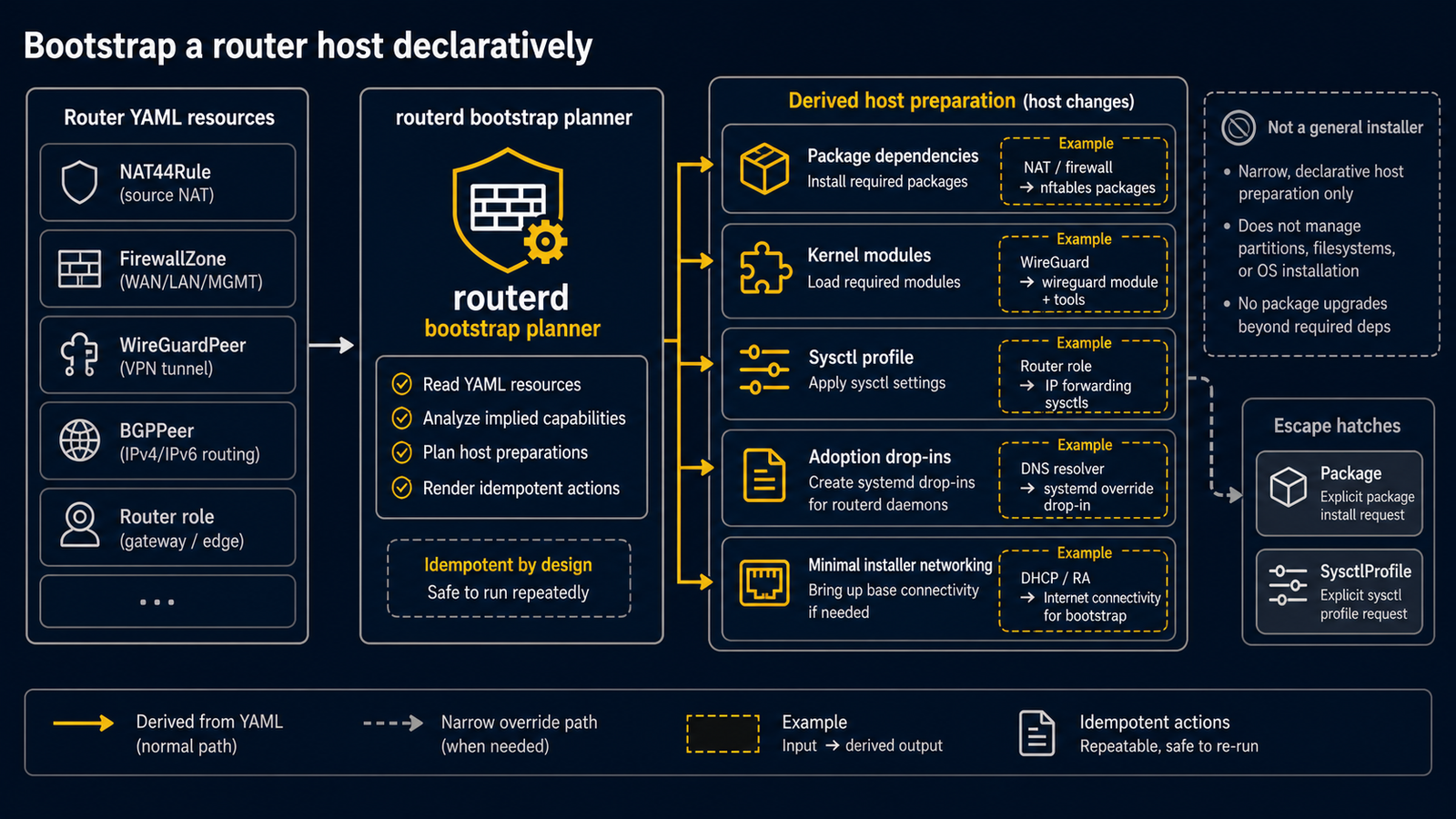
routerd can describe most first-boot host preparation in the router YAML. The goal is not to replace an installer, but to keep the router-specific drift out of ad hoc shell history.
Package Dependencies
routerd derives normal OS package dependencies from the resources in the
config. Use Package only as a narrow override for dependencies that cannot
yet be derived.
apiVersion: system.routerd.net/v1alpha1
kind: Package
metadata:
  name: router-service-dependencies
spec:
  packages:
    - os: ubuntu
      manager: apt
      names:
        - dnsmasq
        - nftables
        - conntrack
        - kmod
        - wireguard-tools
        - tailscale
    - os: alpine
      manager: apk
      names:
        - dnsmasq
        - nftables
        - conntrack-tools
        - iproute2
        - wireguard-tools
        - tailscale
    - os: freebsd
      manager: pkg
      names:
        - dnsmasq
        - wireguard-tools
        - mpd5
Kernel modules
Linux kernel modules are derived from the router resources that need them, such
as NAT, firewall logging, traffic flow logging, and WireGuard. KernelModule
is not a user-facing config kind.
Sysctl profile
routerd derives forwarding, conntrack accounting, reverse-path-filter, redirect,
TCP, and RA sysctls from router resources. Do not list SysctlProfile in normal
configs.
Use SysctlProfile only as a narrow escape hatch for a platform-specific kernel
setting that routerd cannot yet derive. Override only the values that differ
from the profile.
apiVersion: system.routerd.net/v1alpha1
kind: SysctlProfile
metadata:
  name: router-runtime
spec:
  profile: router-linux
  runtime: true
  persistent: true
  overrides:
    net.netfilter.nf_conntrack_udp_timeout: "60"
Existing host networking
routerd derives systemd-networkd and systemd-resolved adoption drop-ins from
Interface, DHCP, DNS, and RA resources. Do not declare those drop-ins in YAML.
On Ubuntu 26.04 LTS, systemd-networkd may bind a DHCPv6 client socket on an
interface even when the installer netplan sets dhcp6: false, depending on RA
state. For routerd-owned WAN/LAN links, also set accept-ra: false during OS
bootstrap and leave only IPv6 link-local addressing at the installer netplan
layer. This keeps UDP port 546 available for routerd-dhcpv6-client and avoids
the install-time network policy competing with routerd's DHCPv6-PD and
RA/DHCPv6 renderers. Keep management DHCP on a separate management interface.
network:
  version: 2
  renderer: networkd
  ethernets:
    wan0:
      dhcp4: false
      dhcp6: false
      accept-ra: false
      link-local: [ipv6]
      optional: true
    lan0:
      dhcp4: false
      dhcp6: false
      accept-ra: false
      link-local: [ipv6]
      optional: true
    mgmt0:
      dhcp4: true
      dhcp6: false
      accept-ra: false
      link-local: [ipv6]
      optional: true
If the WAN needs an RA-learned IPv6 default route for provider DNS or AFTR resolution, declare the WAN interface and the DHCPv6/RA resources. routerd will derive the required systemd-networkd drop-in while keeping systemd-networkd's DHCP clients out of the way.
routerd-managed service units and init scripts are generated from the owning resource kinds. Do not declare local service-manager units in routerd config; write the desired router resources and let the renderer derive the host artifacts.
On Alpine/OpenRC, routerd render alpine --out-dir <dir> can render OpenRC
scripts for routerd, managed dnsmasq, routerd-healthcheck, DNS resolver,
firewall logger, PPPoE, and Tailscale. During apply, routerd installs those
scripts under /etc/init.d and uses rc-update and rc-service only when the
current OpenRC state needs a change.
Synthesized DNS resolver scripts are rendered but not enabled or started until
runtime config materialization is available outside the controller loop.
It does not emulate systemd-only concepts. systemd-networkd/resolved drop-ins,
systemd sandboxing fields, and timesyncd ownership remain unsupported on OpenRC
until they have native Alpine semantics.
Apply order
For a remote router, keep the operational order conservative:
- Install the routerd binaries and a minimal config.
- Validate the full config.
- Run a dry-run apply.
- Confirm management interface and SSH are protected.
- Apply.
- Verify
routerctl get status, forwarding, DNS, and the Web Console.