Guest and IoT client isolation
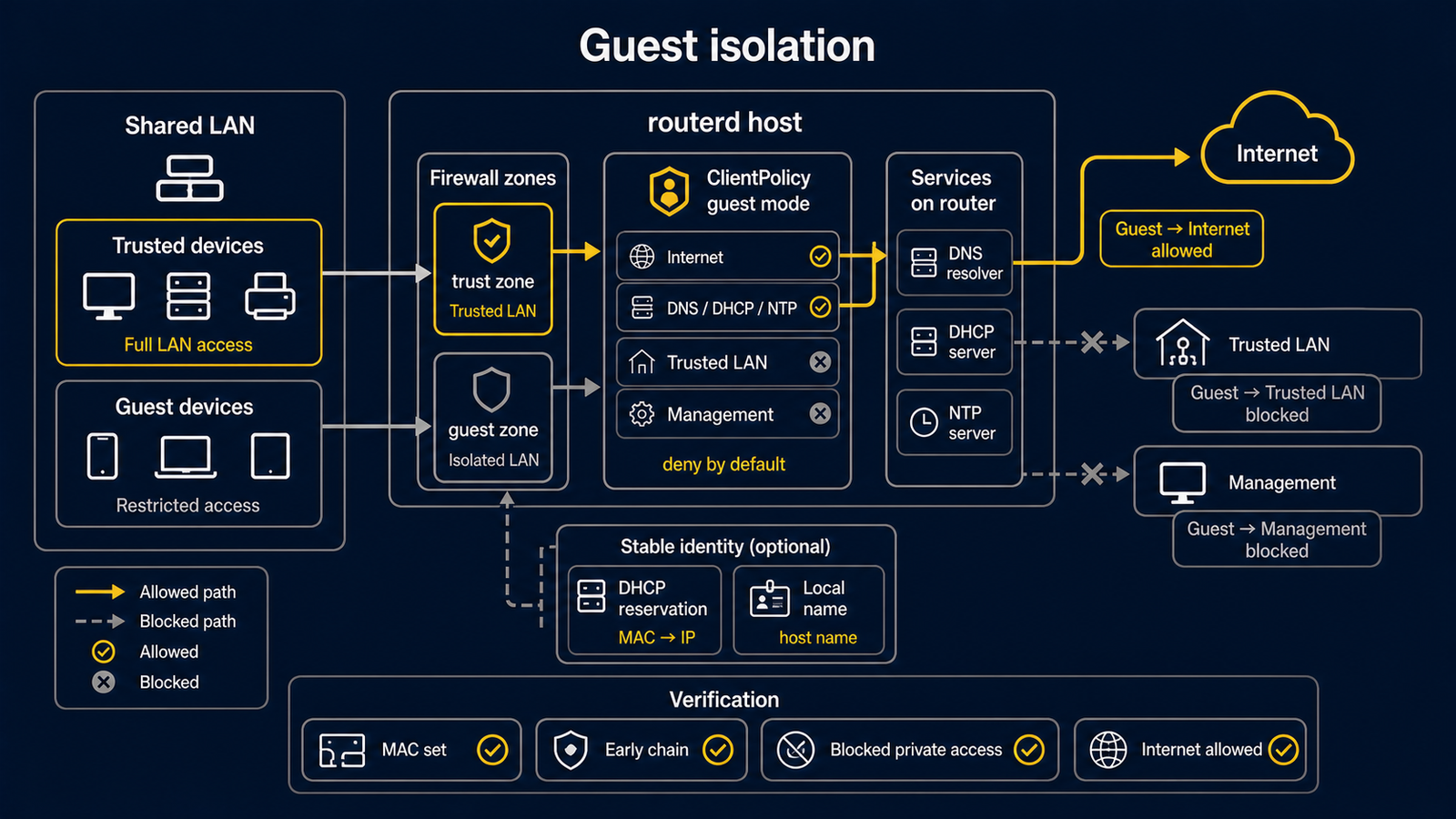
This example shows how a router can classify selected MAC addresses as guest or
IoT clients and apply a ClientPolicy to traffic that reaches the router.
The complete, validated YAML is in examples/guest-mode.yaml.
This policy only controls traffic that passes through the router. Devices on the same switch, VLAN, or Wi-Fi SSID can send layer-2 traffic directly to each other without visiting the router. A MAC address is also not a strong identity; it can be copied.
For a real guest network, use a separate VLAN, SSID, or physical port and turn on the access point or switch's client-isolation feature. Treat this example as an additional router policy, not the security boundary by itself.
Topology
Diagram map
| No. | Meaning | Main resources |
|---|---|---|
| [1] | Router applying the client policy. | FirewallPolicy/default |
| [2] | Shared layer-2 LAN where trusted and guest clients coexist. | FirewallZone/lan |
| [3] | Normal clients not matched by the guest policy. | Default zone behavior |
| [4] | Listed MAC addresses treated as guest or IoT clients. | ClientPolicy/guest-devices |
| [5] | Management destinations blocked from guest clients. | ClientPolicy.spec.isolation.lanMgmt |
What this manages
| Area | routerd resources |
|---|---|
| LAN addressing | IPv4StaticAddress/lan-gateway, DHCPv4Server/lan-v4 |
| Client classification | ClientPolicy/guest-devices |
| Filtering | FirewallZone/*, FirewallPolicy/default |
Key config
# [4] Listed MAC addresses become isolated guest/IoT clients.
- apiVersion: firewall.routerd.net/v1alpha1
  kind: ClientPolicy
  metadata:
    name: guest-devices
  spec:
    mode: include
    macs:
      - 18:ec:e7:33:12:6c
# [4] Router-routed traffic can allow Internet destinations while denying
# router-routed LAN and management destinations.
    isolation:
      lanInternet: allow
      lanLAN: deny
      lanMgmt: deny
      mDNSBroadcast: deny
Checks
routerd validate --config examples/guest-mode.yaml

workdir=$(mktemp -d)
routerd apply --config examples/guest-mode.yaml --once --dry-run \
  --state-file "$workdir/state.db" \
  --ledger-file "$workdir/ledger.db" \
  --status-file "$workdir/status.json"
rm -rf "$workdir"
On an isolated test network, verify the intended routed traffic policy. Do not claim that this proves separation from a device on the same L2 segment.
Common edits
- Use
mode: includewhen only listed MAC addresses are isolated. - Use
mode: excludefor a guest-first network where only listed devices are trusted. - Pair this with DHCP reservations so client names in the Web Console stay readable.
- Add
DNSResolverorNTPServerbefore advertising the router as those services. The example advertises external DNS and does not advertise local NTP.