PPPoE IPv4 NAT gateway
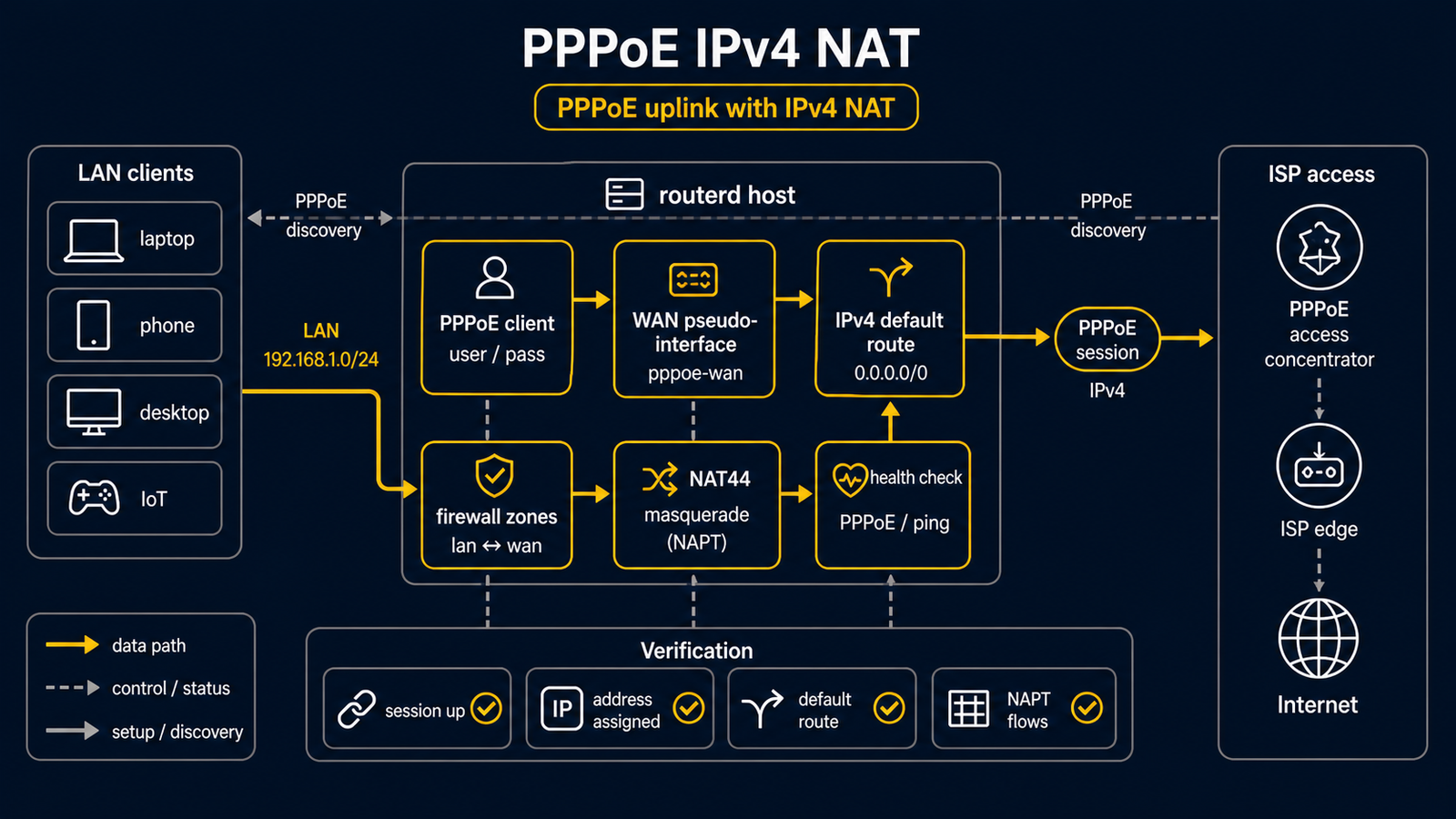
This example is for an access line where the physical WAN is Ethernet but the IPv4 internet session is PPPoE.
The complete, validated YAML is in examples/example-pppoe-ipv4-nat.yaml.
Topology
Diagram map
| No. | Meaning | Main resources |
|---|---|---|
| [1] | Access line or ONU outside routerd management. | External to routerd |
| [2] | Physical Ethernet interface that carries PPPoE. | Interface/wan |
| [3] | PPPoE session and logical egress interface. | PPPoESession/pppoe-home |
| [4] | Host deriving IPv4 forwarding and applying nftables NAT. | Derived host runtime, NAT44Rule/lan-to-pppoe |
| [5] | LAN gateway and DHCPv4 segment. | IPv4StaticAddress/lan-base, DHCPv4Server/lan-dhcpv4 |
| [6] | Clients using PPPoE as their IPv4 internet path through NAT. | DHCPv4Server/lan-dhcpv4 |
What this manages
| Area | routerd resources |
|---|---|
| PPPoE session | PPPoESession/pppoe-home |
| LAN address and DHCPv4 | IPv4StaticAddress/lan-base, DHCPv4Server/lan-dhcpv4 |
| IPv4 internet access | NAT44Rule/lan-to-pppoe |
| Filtering | FirewallZone/*, FirewallPolicy/home |
Key config
# [3] Logical PPPoE interface created over the physical WAN.
- kind: PPPoESession
  metadata:
    name: pppoe-home
  spec:
    interface: wan
    ifname: ppp-home
    username: user@example.jp
    passwordFile: /usr/local/etc/routerd/secrets/pppoe-home.password
    mtu: 1454
    mru: 1454
    defaultRoute: true

# [5] -> [3] LAN IPv4 is masqueraded toward the PPPoE session.
- kind: NAT44Rule
  metadata:
    name: lan-to-pppoe
  spec:
    type: masquerade
    egressInterface: pppoe-home
    sourceRanges:
      - 192.168.40.0/24
Validate before live testing
routerd validate --config examples/example-pppoe-ipv4-nat.yaml
Replace the interface name and credentials first. A one-shot dry-run does not
start routerd-pppoe-client; it waits for that helper's existing status socket.
On a fresh host, its absence makes the preview fail before it can test the
access line. Use the standalone validation above, then make the first live
apply only from a console or independent management path.
After the routerd service starts the helper, inspect routerctl describe PPPoESession/pppoe-home, ip link show ppp-home, and ip route show default.
Common edits
- Put the real PPPoE password in the referenced secret file, not in YAML.
- Keep
mtuandmrualigned with the ISP guidance. - Use
defaultRoute: falsewhen PPPoE is a backup path selected by route policy.